What the RFP Response Desk is
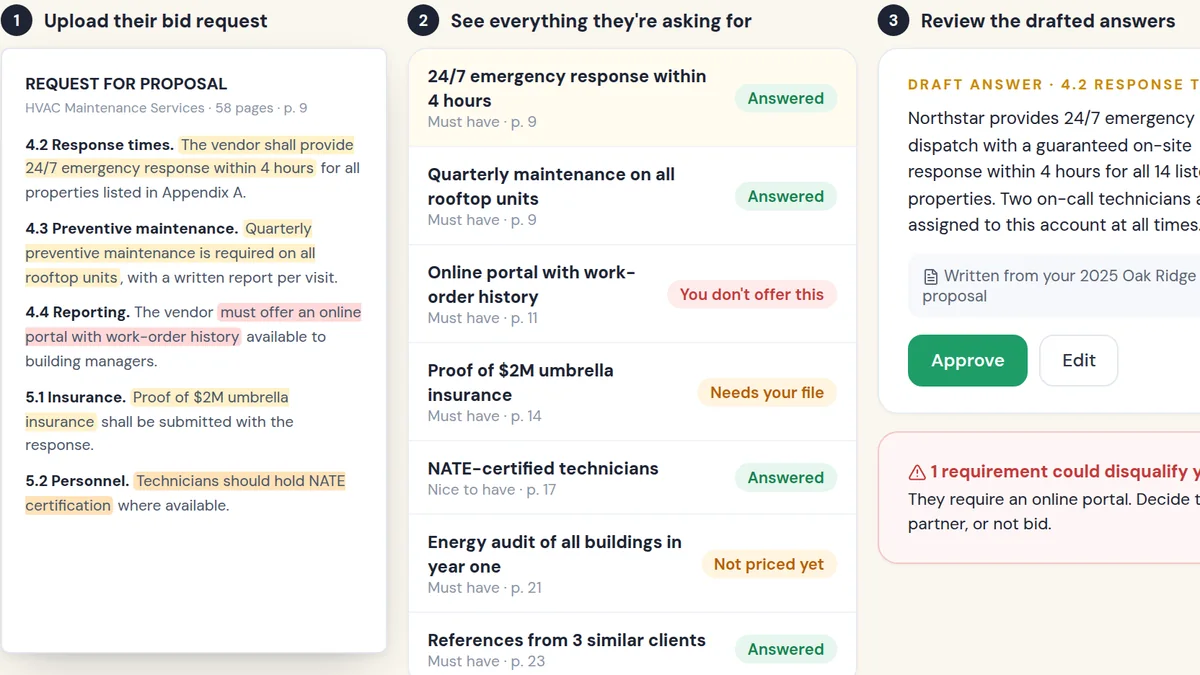
The RFP Response Desk takes a request for proposal and turns it into a structured register: every requirement, the page it came from, and whether your response covers it. It then drafts answers from your previous responses, case studies and product information, and shows gaps clearly.
Your team stays in charge of strategy and pricing. The desk handles the grind: finding every requirement, drafting the standard answers and making sure nothing is missed or promised by accident.
Think of it as a bid manager that never skims.
What people are using it for
Public tenders
Teams bidding on public contracts extract mandatory requirements and compliance items before writing a word.
Security questionnaires
Vendors answer long security and compliance questionnaires from an approved answer library.
Go/no-go decisions
Leaders see the full requirement list early and decide whether the bid is worth the effort.
Scope protection
Sales and delivery confirm exactly which requirements are in scope and priced before the response goes out.
Why people use it over the alternatives
RFP responses fail in two ways: they miss a requirement and get disqualified, or they agree to everything and the company loses money delivering it. Both come from the same problem, which is that nobody has a complete, page-referenced list of what is being asked.
Building that list by hand takes days. AI can draft it in minutes and a person can verify it in an hour. Then the drafting is faster too, because most answers are variations of answers you have already written.
| Option | What usually happens | With RFP Response Desk |
|---|---|---|
| Copy-paste old proposals | Fast, but outdated answers and missed requirements slip through. | Answers drafted from your library and matched to each requirement. |
| Requirements in a spreadsheet | Someone spends days reading and typing. | Every requirement extracted with its page reference. |
| Saying yes to everything | You win work you priced wrong. | A clear view of what is covered, what is not and what is optional. |
When you should not use it
- You rarely respond to RFPs.For one or two a year, a careful person with a checklist is fine.
- The decision is already made.Some RFPs exist to satisfy procurement after a vendor is chosen. Qualify before you invest the effort.
- You have no past answers to learn from.The desk drafts from your existing material. With nothing to draw on, it can extract requirements but not much more.
Tactics that make it work
Extract first, write second
Build the full requirement register before drafting anything. You will catch disqualifiers early.
Reference every page
Keep the page number beside each requirement so reviewers can check the source in seconds.
Mark optional scope clearly
If a requirement is a change from the base offer, present it as an option with its own price.
Keep an approved answer library
Store your best answers to common questions and update them after every bid.
Have a person sign off on commitments
Anything that commits you to delivery, price or compliance needs human approval.
A 270-row register that saved a bad deal
SimpliScale internal project, October 2026.
A real estate brokerage sent us its own RFP for a custom platform. Before quoting, we ran every page through the same process this desk uses. The result was a 35-page internal audit with a 270-row requirement register, each item tied to the page it came from.
It showed something important: neither of the fixed-price proposals we had discussed actually covered the full RFP. One requirement we had talked about even conflicted with what the RFP explicitly prohibited, so it had to be presented as an optional scope change. Instead of signing something that looked complete, we wrote separate proposals with an exact comparison of what each covered. That conversation was harder, but the alternative was delivering work we hadn't priced.
Buyers are using AI to write longer, more detailed RFPs. Responding well means reading every line, answering precisely and being clear about scope. Doing that by hand is slow and error-prone.
If you are an owner or sales leader whose growth depends on winning formal bids, a desk that catches every requirement and drafts from your best past answers means more bids, better bids and fewer surprises after you win.
- Every requirement extracted with its page reference
- Drafts from your best past answers
- A clear line between included and optional scope
for you?
On a short, personalized call we'll look at how your business runs today and show you how this would plug into your leads and tools. You'll get a straight answer on whether we can help you get similar results, and what it would take to respond to more bids, faster, without scope surprises.
- Personalized to your business
- See the system working
- Honest answer on fit