What a Subcontractor Bid Board is
A Subcontractor Bid Board is a private dashboard for one job: getting bids from subs and choosing between them. You create a project, write the scope once for each trade, and send your subs a link. They see the scope and submit their number through a simple form.
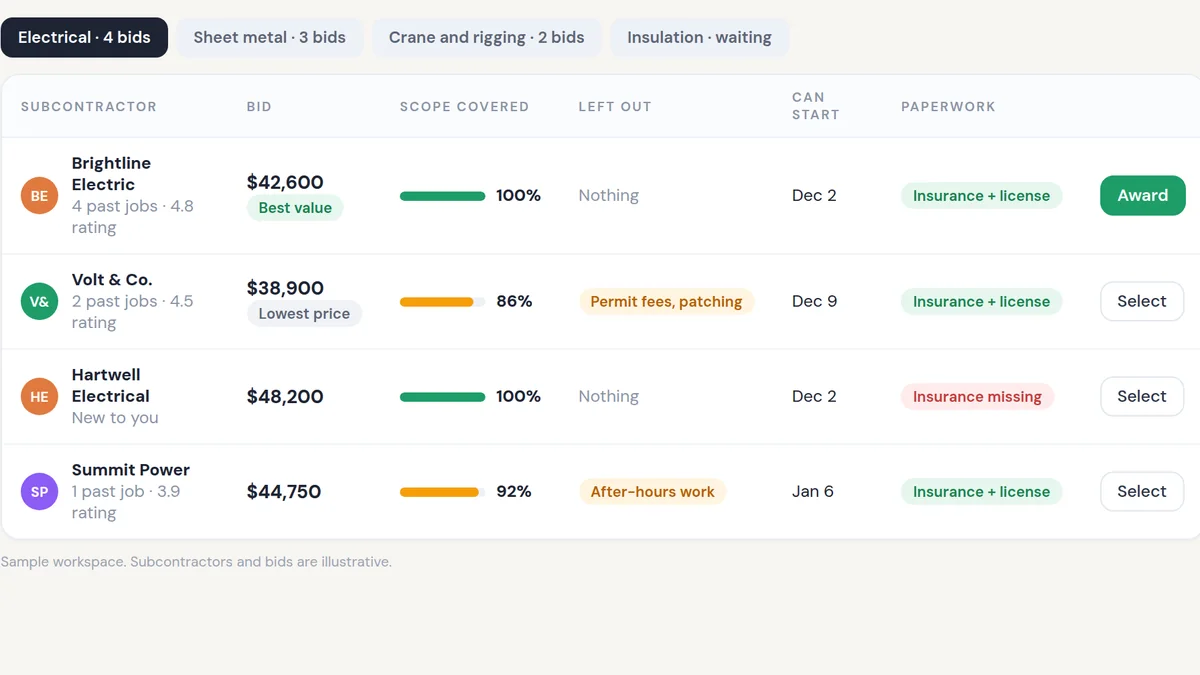
Every bid lands in the same table. For each trade you see the price, what each sub included, what they left out, when they can start and whether their insurance and license are on file. AI reads the bids that arrive as PDFs or emails and puts them into the same format, then points out when a cheaper bid is cheaper because it covers less.
Subs see the scope of work. They do not see what you are charging the client, your markup or each other's bids. You make the decision. The board makes sure you are comparing the same job.
What people are using it for
Comparing bids on one screen
Every sub's number for a trade sits in one table, with scope coverage and exclusions next to the price.
Sharing scope without sharing your price
Subs get the drawings and scope. Your client price and markup stay on your side of the board.
Chasing late bids
Subs who have not responded get automatic reminders before the deadline, so you are not making calls the night before.
Checking your margin before you award
Pick a bid and see what it does to your margin on that trade and on the whole project.
Why people use it over the alternatives
The lowest bid is often not the cheapest. One sub includes permits and patching, another leaves them out, and the difference shows up as a change order halfway through the job. When bids arrive in five formats, spotting that takes hours of reading.
A bid board makes every sub answer the same scope, so differences are visible straight away. It also keeps a record: who was invited, who bid, what they included and why you chose the one you did.
| Option | What usually happens | With Subcontractor Bid Board |
|---|---|---|
| Email and PDFs | Bids in different formats, compared from memory or a late-night spreadsheet. | Every bid in one table with the same columns. |
| A shared spreadsheet | Someone retypes every bid, and the sheet is out of date by the next revision. | Subs enter their own numbers. AI reads the ones sent as documents. |
| Large construction software | Powerful, but heavy to set up and built for big bid departments. | Built around how you already hire subs, with only the parts you need. |
When you should not use it
- You use the same sub for each trade every time.If you are not really comparing bids, you do not need a board to compare them.
- Your jobs are small and priced on the spot.For a one-day job with one sub, a phone call is faster.
- Your subs will not use a link.If your subs only bid by phone, someone still has to enter the numbers. The board helps with comparison, but not with collection.
Tactics that make it work
Write the scope once, by trade
Give every sub in a trade the exact same scope and inclusions list. Comparable bids start with identical questions.
Ask what is excluded
Make exclusions a required field. Most bid surprises live there.
Set one deadline and let reminders run
A fixed due date with automatic reminders gets more bids in than chasing each sub by hand.
Keep your price private
Share scope and drawings, never the client contract value. Subs bid their cost, not a share of your margin.
Record why you awarded
Note the reason for each award. It protects you on the next job and when a client asks.
A sub portal for a general contractor
We built a working demo of this for a general contractor who was managing every subcontractor by email. Each sub got a separate message with job details, there was no central place to track bids, and comparing prices meant opening one email after another.
His main request was specific: subs should see the scope without seeing his markup. The demo gave him a project page with three views: scope of work, bids and an internal view only he could open. Subs got a public link showing the scope with no pricing and a form to submit their bid, with no login. On the internal view he could set a markup percentage and see profit per sub and for the whole project. It was a demo, so we have no before-and-after numbers to report.
Material and labor costs move fast, and subs price that risk into their bids in different ways. A contractor who can see exactly what each bid includes makes better awards and has fewer change orders.
If you are an owner who still compares bids from an inbox, a bid board gives you the whole picture in one place and the time to make the decision properly.
- Every bid for a project in one dashboard
- Scope gaps visible before you award
- Your price and markup stay private
for you?
On a short, personalized call we'll look at how your business runs today and show you how this would plug into your leads and tools. You'll get a straight answer on whether we can help you get similar results, and what it would take to choose the right sub for every job and protect your margin.
- Personalized to your business
- See the system working
- Honest answer on fit